Playwright Actions
Purpose
This document outlines Playwright actions in ZeuZ Node and the implementation of driver switching between Playwright and Selenium. This feature allows for global or granular control over which driver executes your web actions, supported by a seamless background connection mechanism.
Playwright actions are designed to mimic the behavior of their Selenium counterparts. They use the same step data format, action names, element parameters, optional parameters, and saved variable patterns wherever a matching Selenium action exists. This lets existing test case, test set, test step, and action data stay unchanged when switching from Selenium to Playwright through BROWSER_DRIVER, the browser driver optional parameter, or by changing selenium action to playwright action.
Why it matters / Use Cases:
- Provides flexible driver switching: Users can switch between Playwright and Selenium globally or for specific actions without rewriting test cases.
- Reduces test maintenance effort: Since Playwright actions follow the same structure as Selenium actions, existing test cases, test steps, and action data remain unchanged.
- Supports gradual migration: Teams using Selenium can adopt Playwright step by step instead of migrating all automation at once.
- Improves execution performance: Playwright often provides faster and more reliable browser automation, especially for modern web applications.
- Ensures compatibility with existing workflows: The same action names, parameters, and saved variable patterns can be reused, making the transition smooth.
- Enables granular execution control: Specific steps can run on Playwright while others continue using Selenium, depending on testing requirements.
Prerequisites
- ZeuZ Node must be properly configured to support Playwright execution.
- Runtime parameter must be properly configured to enable and execute Playwright actions.
- Users should have a valid web test case or test step already created in ZeuZ.
- Existing actions should follow the supported Selenium-compatible action structure for seamless switching.
- The browser driver or relevant optional parameter must be configured to switch between Playwright and Selenium.
- Required action data, element parameters, and optional parameters should be properly defined before execution.
Implemented Playwright Actions
All existing web Selenium action data can be routed to Playwright by selecting Playwright as the browser driver. The currently declared Playwright actions include:
- Browser and navigation:
open browser,open electron app,go to link,go to link v2,tear down browser,teardown,switch browser,navigate,get current url. - Element interaction:
click,double click,right click,hover,click and download,text,keystroke keys,keystroke chars,drag and drop,upload file,copy image into browser. - Validation and extraction:
validate full text,validate partial text,if element exists,save attribute,change attribute value,get element info,extract table data,save attribute values in list,save web elements in list. - Selection and form controls:
select by visible text,deselect by visible text,select by value,deselect by value,select by index,deselect by index,deselect all,check uncheck,check uncheck all,multiple check uncheck,slider bar. - Page structure and windows:
switch window,switch window or frame,switch window/tab,open new tab,close tab,switch iframe,handle alert. - Scrolling, waits, screenshots, and browser tooling:
scroll,scroll to element,scroll element to top,scroll to top,take screenshot web,execute javascript,resize window,wait for element,capture network log,start tracing,stop tracing,intercept network.
For the matching Selenium-style actions, the intent is compatibility rather than a new test authoring model. For example, a step that currently uses click | selenium action | click with the same element parameters can run through Playwright when driver routing selects Playwright.
Configuration Parameters
You can control driver execution using two distinct parameter types: a global runtime parameter and a step-specific optional parameter.
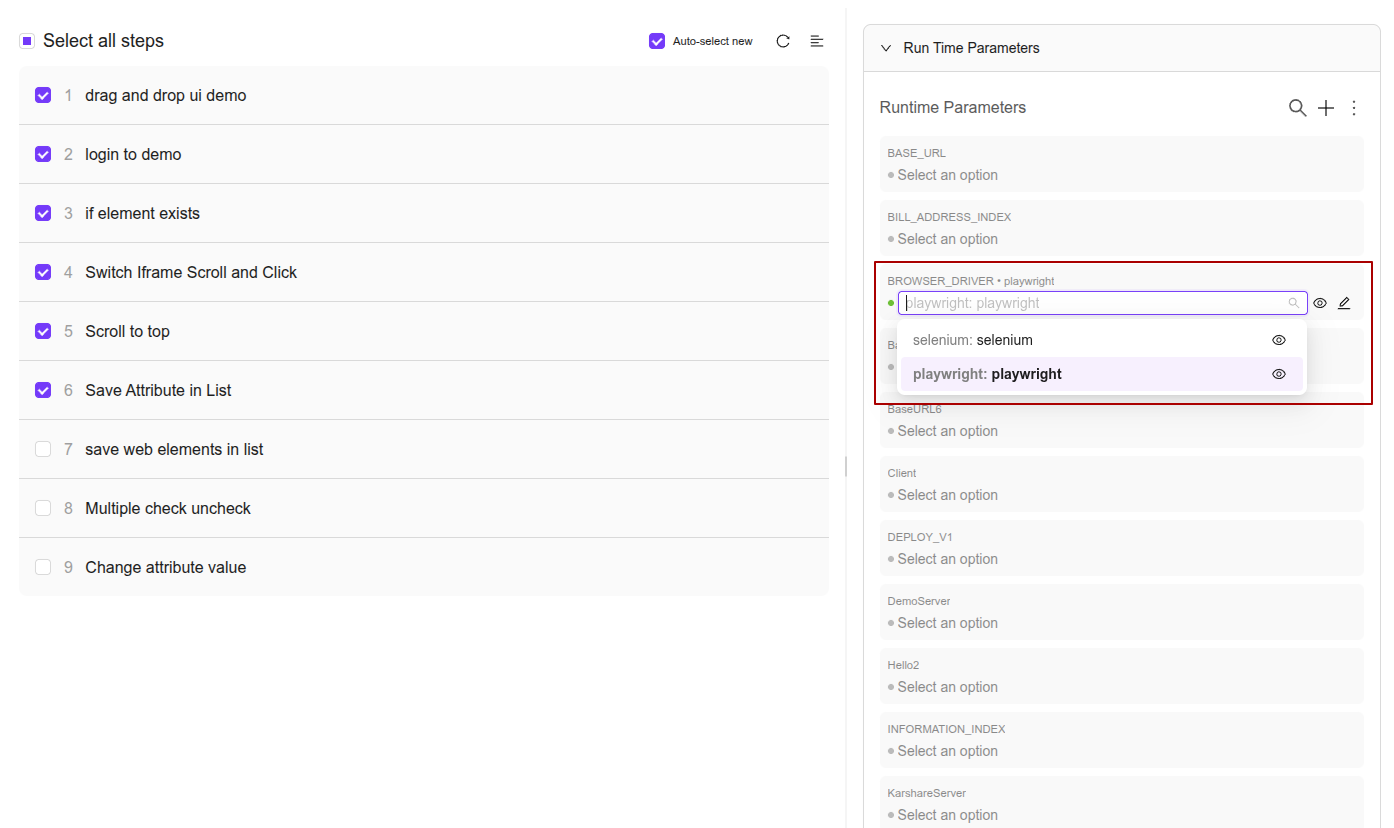
1. Global Runtime Parameter: BROWSER_DRIVER
- Refer to Runtime Parameters
The BROWSER_DRIVER parameter sets the execution engine for the entire test case.
- Values: Can be set to either
playwrightorselenium. - Behavior: Ensures all web actions in the test case are executed through the chosen driver, regardless of the individual step definitions.
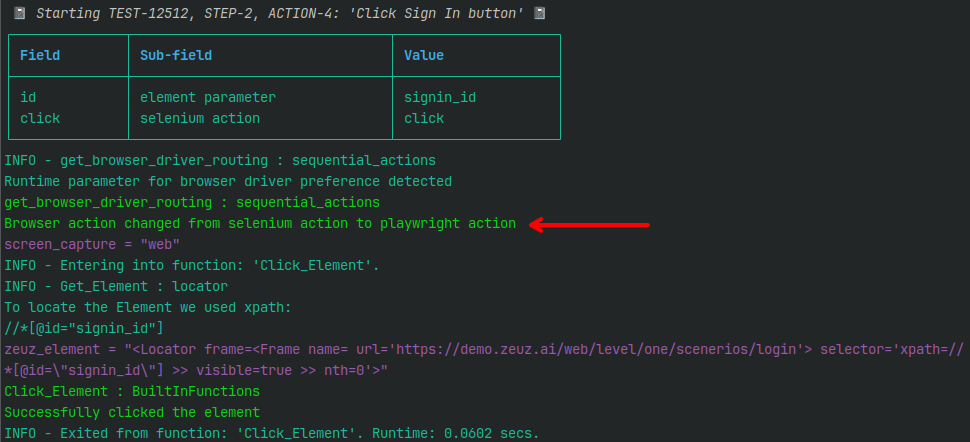
- Example: If a test case contains steps defined as
selenium actionbutBROWSER_DRIVERis set toplaywright, Node will internally convert those actions toplaywright actionat runtime.
2. Granular Optional Parameter: browser driver
The browser driver parameter provides fine-grained control and takes the highest priority if both parameters are present.
- Usage: This can be added to any specific web action.
- Override Logic: It overrides global driver preferences for specific steps.
- Result: It has the same execution effect as changing the action subfield from
selenium actiontoplaywright action, or fromplaywright actiontoselenium action, but without editing the original action row.

- Example: If an action is defined as a
selenium actionbut includes this optional parameter set toplaywright, the action is converted toplaywright actioninternally at runtime.
| Parameter | Type | Value |
|---|---|---|
| browser driver | optional parameter | playwright |
| click | selenium action | login_btn |

Parameter Priority Logic
| Parameter | Scope | Priority | Supported Values |
|---|---|---|---|
browser driver | Step-level (Optional) | Highest | playwright, selenium |
BROWSER_DRIVER | Test-level (Runtime) | Medium | playwright, selenium |
Playwright Globals for Custom Python
When writing custom logic with execute python code, ZeuZ Node exposes Playwright-related shared variables that can be useful for direct Playwright access:
- For direct API usage, refer to the official Playwright Python documentation.
| Shared Variable | Description |
|---|---|
playwright_page | The active Playwright Page object. Use this for page-level operations such as evaluating JavaScript, reading the current URL, or interacting with locators directly. |
playwright_context | The active Playwright BrowserContext. Use this for context-level operations such as permissions, tracing, cookies, pages, or downloads. |
playwright_browser | The active Playwright browser object, or the launched Electron app object for Electron sessions. |
playwright_frame | The active frame or frame locator set by switch iframe. This is cleared when navigating to a new page or switching back to the top page context. |
browser_sessions | The session map used by web actions. Sessions can contain Playwright page/context/browser objects, Selenium drivers, frame state, and remote debugging ports. |
active_web_driver_type | The active driver type for the current web session, usually playwright or selenium. |
element_wait | The current element wait timeout in seconds. Playwright actions use this as the default wait where applicable. |
selenium_driver | The active Selenium driver. This may also be available when Selenium is bridged to a Playwright-launched Chromium browser. |
These variables are intended for advanced custom actions. Standard test steps should continue to use ZeuZ action rows so the framework can handle waits, sessions, screenshots, logging, and driver routing consistently.
Legacy execute python code custom actions that use Selenium global variables are also expected to continue working when the test is routed to Playwright mode. For Chromium-based browsers, ZeuZ Node automatically establishes a CDP bridge from the Playwright browser session back to Selenium and exposes the bridged Selenium driver through the usual Selenium globals, including selenium_driver. This keeps existing custom Python code usable during migration, as long as the browser supports the CDP bridge.
Seamless Driver Switching
The system maintains a live bridge between drivers to ensure that switching does not interrupt the browser session.
- Automatic Connection: Browsers launched with Selenium are automatically connected to a Playwright instance in the background, and vice versa.
- Interoperability: This bridge allows
playwright actionto run on browsers originally launched by Selenium, andselenium actionto run on browsers launched by Playwright.
Technical Requirement: Chromium Only
This seamless switching utilizes the Chrome DevTools Protocol (CDP) to establish a remote debugging bridge. Consequently, this feature only works on Chromium-based browsers.
FAQs / Troubleshooting
How do I enable Playwright for test execution?
Configure the required runtime parameter or set the browser driver to Playwright before execution.
Can I switch between Selenium and Playwright without changing test steps?
Yes. Since Playwright actions follow the same structure as Selenium actions, existing test steps can be reused without modification.
Why is the test still running on Selenium instead of Playwright?
Check whether the driver was correctly switched through BROWSER_DRIVER, the browser_driver optional parameter, or by selecting the Playwright action.
Do I need to rewrite existing Selenium test cases for Playwright?
No. In most cases, existing test cases, test steps, and action data remain unchanged.
Can both Selenium and Playwright be used in the same test case?
Yes. ZeuZ supports granular driver switching, allowing different steps within the same test case to use different drivers.
Changelog
- New feature has been added [202605]