Teardown Web Browser
Purpose
This action closes the currently active web browser. It is useful for cleaning up at the end of a test case or when no further actions on the browser are needed. This action ensures that no residual browser instances are left running, which can consume system resources or interfere with subsequent tests.
Scenarios
Scenario 1
Title:
Close the browser after completing the task
Test case link: TEST-7984 Close browser after completing first task
Scenario Overview:
Suppose we need to perform two different tasks within a single test case. After completing the first task, we need to close the web browser to ensure it does not affect the execution of the second task.
Steps to Follow:
- Open the browser and navigate to the target webpage.
- Perform all test actions according to the test case.
- Use the "Tear down browser" action to close the browser.
- Open the website again.
- Perform all test actions according to the test case.
Actions:
| Parameter | Type | Value |
|---|---|---|
| tear down browser | selenium action | Teardown |
- Close the browser after completing the first task.
Expected Result:
- The browser must close without encountering errors.
- Verify if any unsaved data or pop-ups are preventing the browser from closing.
Common Errors and Fixes:
- Error: The browser fails to close.
- Fix: Verify if any unsaved data or pop-ups are preventing the browser from closing.
Runtime Parameter: zeuz_auto_teardown
zeuz_auto_teardown controls when Zeuz automatically tears down browser sessions during a deployed run. Use it when browser state must either be isolated between test cases or intentionally preserved across selected test cases.
| Value | Behavior |
|---|---|
on | Default behavior. Teardown runs at run start and after each test case. Values yes, true, and enable also behave like on. |
off | Disables automatic teardown. Values no, false, and disable also behave like off. Manual teardown actions still run. |
on_run_end | Skips teardown between test cases and runs teardown only after the last selected test case in the non-debug run. |
on_run_start_and_end | Runs teardown before the first test case and after the last test case, but not between test cases. |
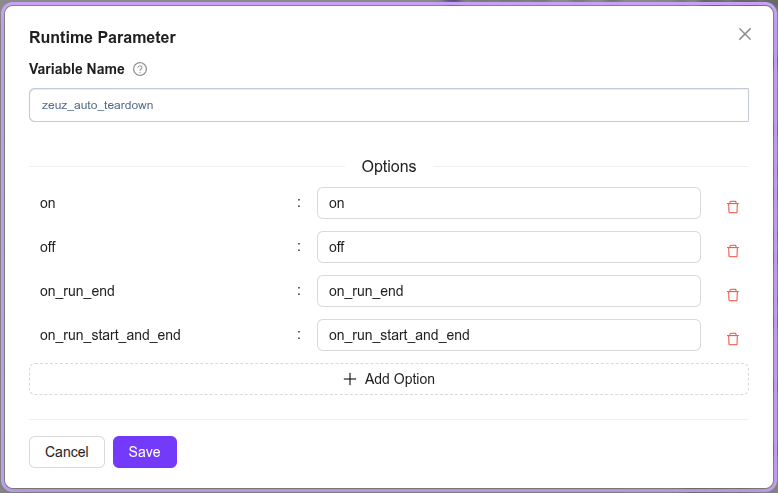
Example uses:
- Use
on_run_endwhen a group of test cases intentionally shares one browser session, such as prerequisite flows where TC B depends on browser state from TC A. - Use
on_run_start_and_endwhen you want to clear any leftover browser from a previous run, keep the session open across the selected test cases, then close it at the end. - Use
offonly when cleanup is handled manually or the browser must remain open after execution for investigation.
Additional Tips for this Action
- Use this action at the end of every test case to ensure proper cleanup, if necessary.
- Verify that no unsaved data or confirmation prompts are blocking the browser from closing.
Error Handling for Teardown Web Browser
Common Problems and Their Fixes:
-
Problem: The browser does not close.
Possible Cause: A pop-up or alert is preventing the browser from closing.
How to Fix: Handle any pop-ups before triggering the "Teardown Web Browser" action. -
Problem: The browser process remains active in the background.
Possible Cause: The browser was not terminated completely.
How to Fix: Check the system task manager and manually terminate any remaining processes, if necessary. -
Problem: The "Teardown Web Browser" action fails intermittently.
Possible Cause: Network issues or an unstable browser state may be causing the problem.
How to Fix: Ensure that the browser is responsive before triggering the action.
General Error Handling Tips
- Always handle unsaved data and pop-ups before closing the browser.
- Use logging to confirm that the "Teardown Web Browser" action executed successfully.
- Ensure that the action is placed appropriately in the test flow to avoid premature termination.