AI-Standup
AI Standup is an automated reporting feature that supports or replaces traditional daily standup meetings by collecting development activity and generating structured summaries including manual input. Its purpose is to improve team visibility by showing daily progress, comparing planned commitments with completed work, and highlighting items such as pull requests and ongoing tasks that require attention, allowing teams to track progress and manage work more efficiently. This page primarily displays two sections: Daily Standup and Team Report.
Why it matters / Use Cases:
- Reduces manual standup effort: AI Standup minimizes or replaces daily standup meetings by automatically collecting and summarizing progress updates.
- Improves team visibility: It gives teams and managers a clear view of daily progress, making it easier to understand who is working on what.
- Tracks planned vs completed work: It helps compare committed tasks with completed tasks to measure progress and identify delays.
- Highlights blockers quickly: Pending tasks, unresolved issues, or ongoing work are surfaced early so teams can take action faster.
- Supports remote team collaboration: It keeps distributed teams aligned by providing structured daily reports without requiring everyone to join a meeting.
Prerequisites
- Access to ZeuZ Server with permissions for Project → View → AI-Standup.
- Project activities must be available in the system.
- Team members should have assigned work items.
- Development tools should be integrated.
- Manual input access should be enabled.
- Team members must have access to the AI Standup page.
Features
Daily Standup
-
The Daily Standup section contains two subsections: Standup Report and PR Reviews.
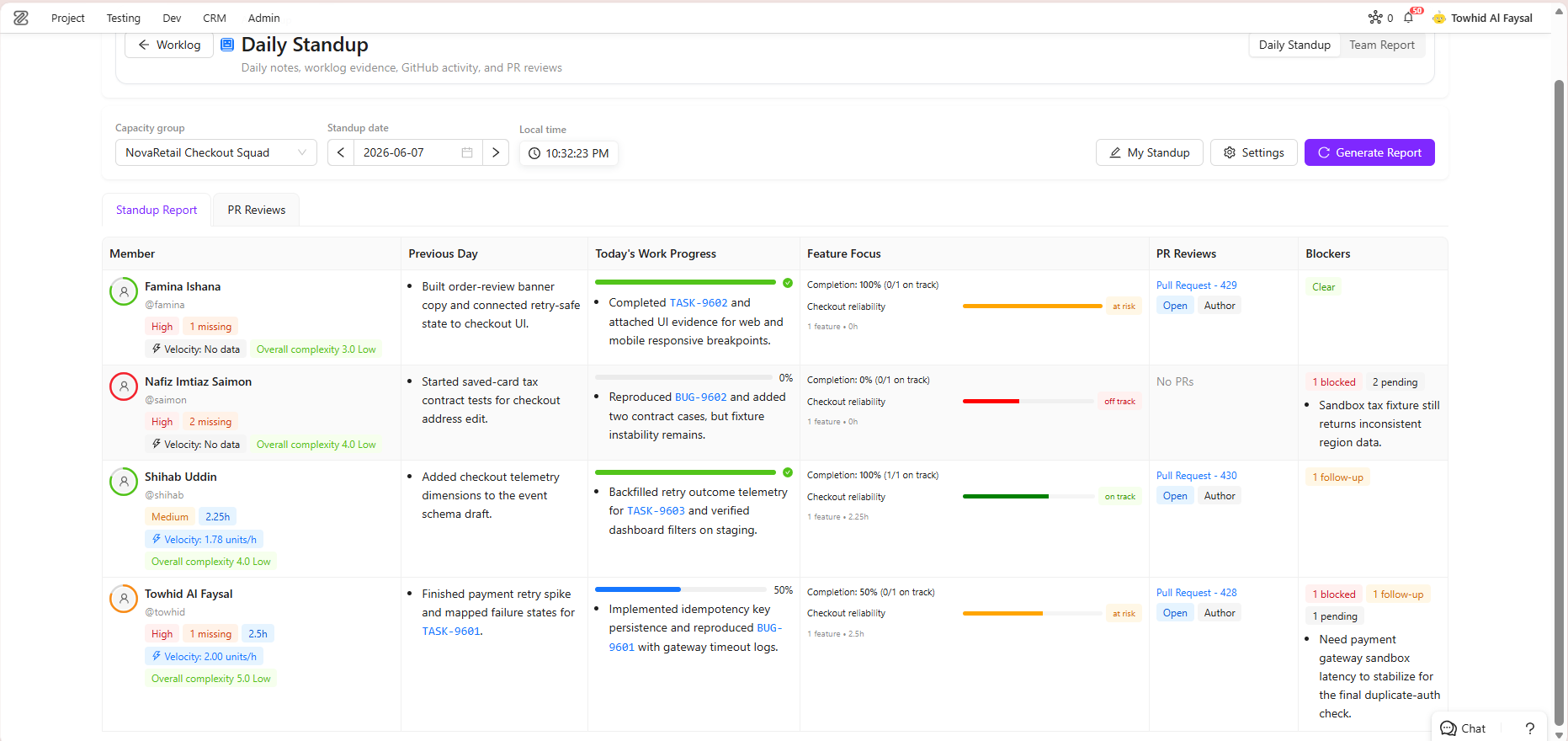
- Standup Report: It is the primary report that compares the team's previous day's commitments and completed work with the current day's planned tasks. This helps track progress, evaluate commitment fulfillment, and provide a clear view of ongoing activities.
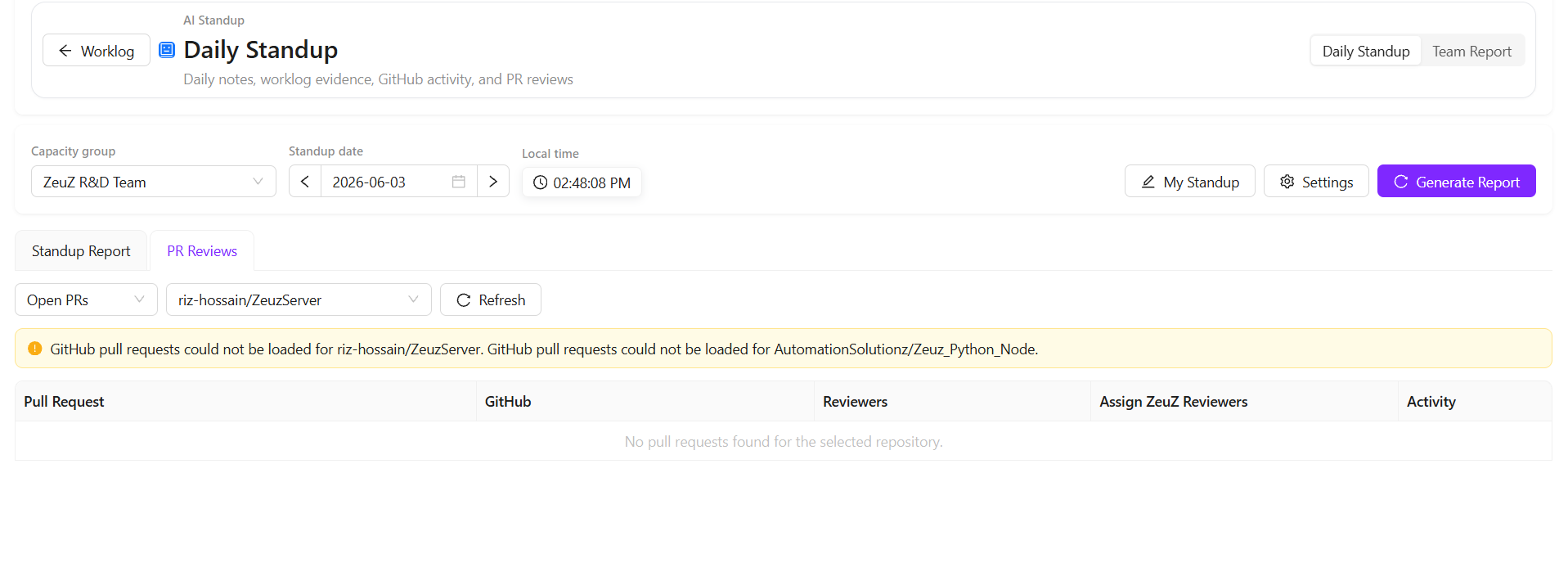
- PR Reviews: It displays pending GitHub pull requests that require review. If multiple pull requests are awaiting attention, they can be assigned to specific developers directly from this section. Assigned developers can then review the pull requests and provide the necessary feedback or approval.
-
Before generating Daily Standup reports, two things must be configured:
- A Capacity Group must be selected or created.
- Daily Standup Settings must be configured.
-
If a Capacity Group already exists, simply select it from the list. If no suitable group exists, create a new one and then select it. Once a Capacity Group is selected, a notification may appear indicating that the Daily Standup settings have not yet been configured.
-
To configure the settings, select Open Settings. This opens a sidebar where the Daily Standup configuration can be managed. The same sidebar can also be opened from the Settings button available on the page.
-
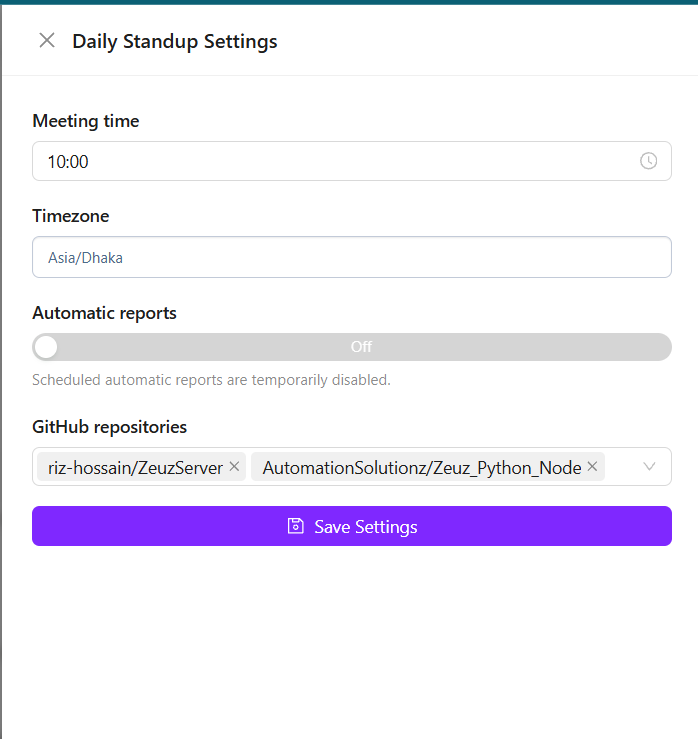
The Daily Standup Settings include the following options:
- GitHub Repositories: Select the repositories that should be included in the report. The available repositories are displayed based on the configured code repository integrations. For example, a team may select the ZeuZ Server repository and the ZeuZ Python Node repository if work is being performed in both.
- Meeting Time: Define the time when the standup report should be generated. For example, if the daily status meeting takes place at 10:00 AM, the report can be configured to generate automatically at 9:45 AM so that managers can review the latest progress before the meeting.
- Timezone: Select the timezone that should be used for report generation.
- Automatic Reports: This option is currently disabled but will be available in a future release to enable automatic report generation.
-
After configuring the required settings, select Save Settings to complete the setup.
-
The selected Capacity Group determines which users and activities are included in the report. Daily Standup reports do not use a custom date range. Instead, they are generated based on a rolling 24-hour period calculated from the configured meeting time. For example, if the meeting time is set to 10:00 AM, the report includes all relevant work completed between 10:00 AM on the previous day and 10:00 AM on the current day.
-
In addition, repositories must be selected in the settings. This is important because development activity is collected from the configured source code repositories, where developers work through commits and related changes. Therefore, both Capacity Group selection and settings configuration are mandatory to ensure accurate data collection and reporting.
My Standup
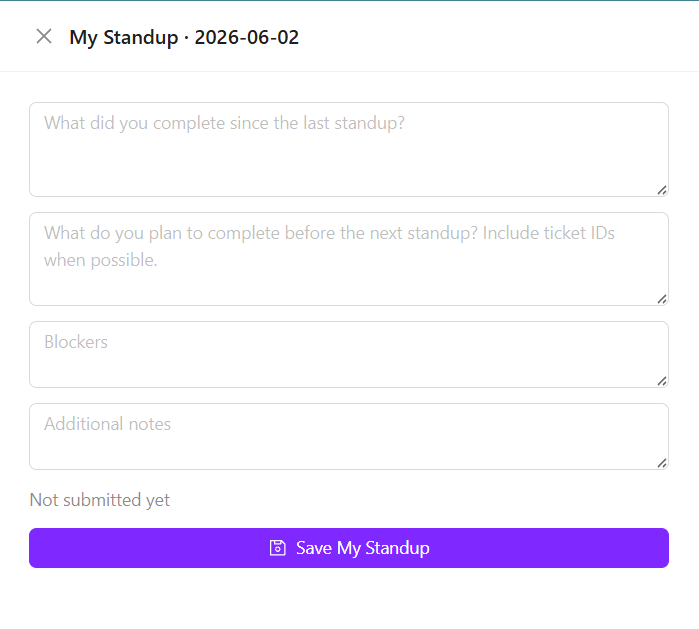
- My Standup is a feature where users record what they have completed since the last standup and what they plan to work on for the current day. It also allows users to mention any planned tasks, such as completing a specific feature or fixing a bug, along with any blockers or additional notes.
- Once the daily standup is saved, it becomes a reference point for the next report generation. In the next cycle, the system uses these entries to evaluate progress and generate the standup report based on the recorded commitments and the tasks that have been completed.
- Currently, Daily Standup reports are generated manually and are not yet fully automated. After selecting a Capacity Group, users can generate the report by clicking the Generate Report button. Once generated, the report is displayed in a table view containing all members of the selected Capacity Group, such as a POD team.
- The report generation process is based on a comparison between the previous day's commitments and the work completed since then. For example, during today's standup, team members record what they have completed, what they plan to work on next, and any relevant notes. When the next day's report is generated, the system uses those standup entries as a reference and compares them with the actual work completed during the reporting period.
- The report includes a summary of the commitments made in the previous standup. It then evaluates the current progress against those commitments. For example, if a user previously committed to "close the remaining review items on TASK-98987," the report checks whether that work has been completed and reflects the result in the current progress section.
- To make the report easier to understand, AI-generated summaries are provided for both the previous day's commitments and the current day's work progress, giving managers and team members a quick overview of planned versus completed work.
-
The report includes several columns that provide detailed insights into team progress and individual performance:
- Feature Focus displays a summary of the features associated with the tickets worked on during the reporting period. Since each ticket is linked to a specific feature, the system analyzes all completed work and provides a progress summary for those features. It indicates whether a feature is on track, at risk, or off track based on the progress of its related tasks.
- PR Review shows the status of assigned pull request reviews. If a pull request has an assigned reviewer and a due date, the report displays the remaining time available to complete the review. If the review is not completed by the due date, the overdue duration is shown. Once a pull request has been reviewed and merged, its status is updated accordingly.
- Pending / Blockers highlights any issues that may be preventing progress. The AI analyzes reported blockers, work activity, and standup information to generate a summary of pending items and obstacles. Any blockers explicitly mentioned by team members are also included in this section.
- Member Metrics provides a summary of each user's activity and productivity. It shows how much time was spent on different types of work, such as development, testing, documentation, and other activities. This section also includes velocity metrics, overall complexity, and work distribution for the last 24 hours.
- Risk Assessment evaluates how closely actual progress aligns with the commitments made during the previous standup. For example, if a user committed to completing four tasks and successfully completed all of them, the risk level is considered low. If only 50 percent of the planned work was completed, the risk level may be considered as medium. If little or no progress was made against the commitments, the risk level is considered high.
-
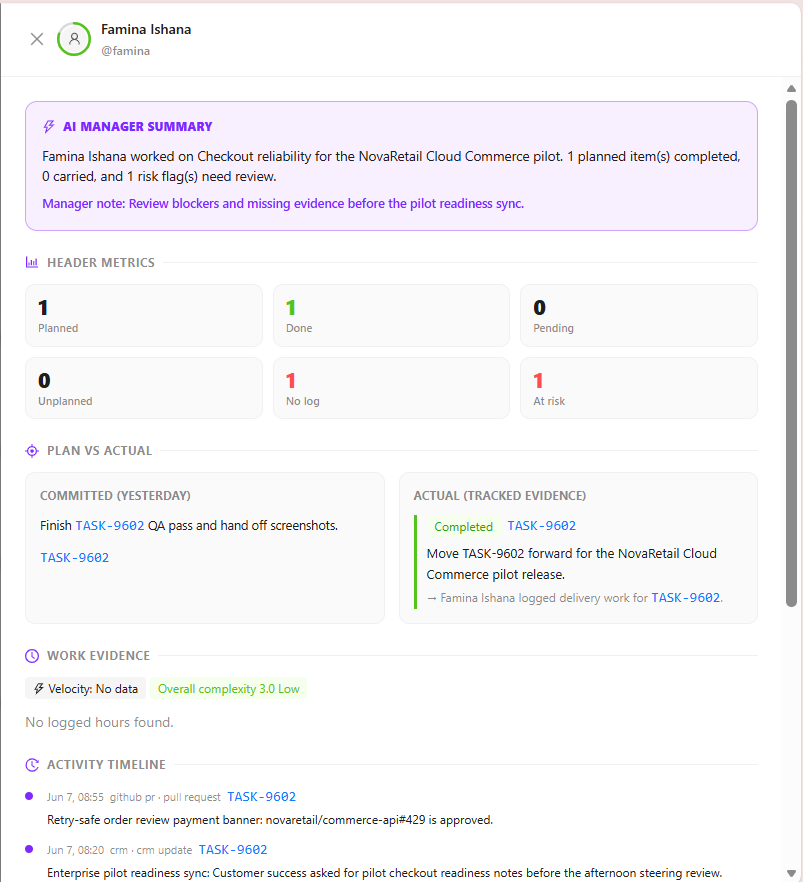
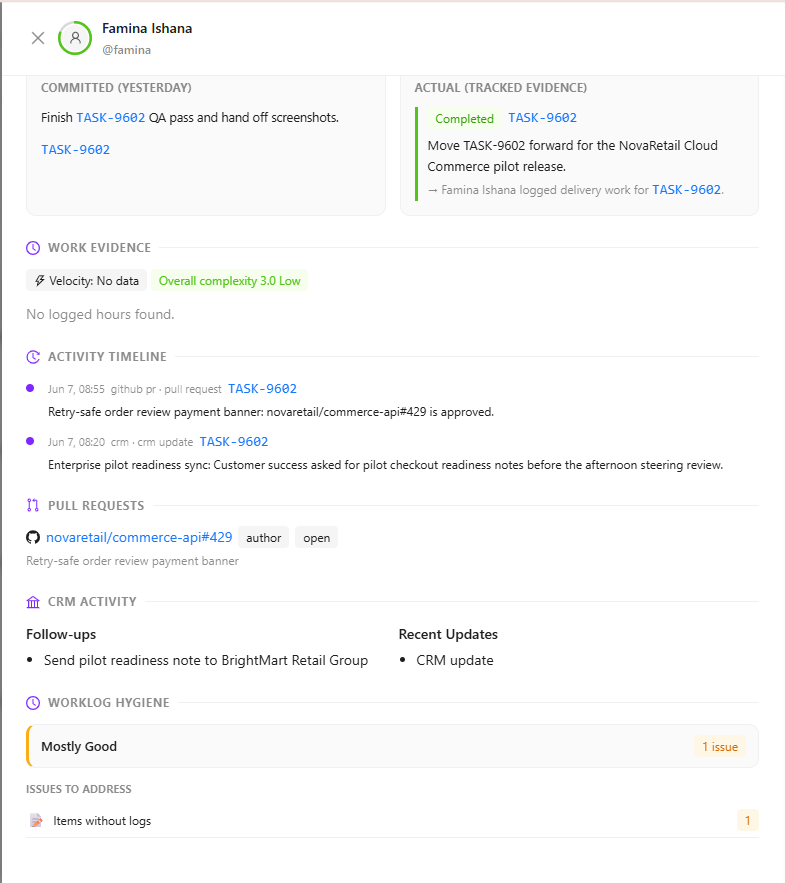
Selecting any row in the report opens a detailed sidebar containing additional information about that team member's activities. The sidebar includes:
- Plan vs Actual: A comparison between planned commitments and completed work.
- Work Evidence: Evidence of completed activities, including the amount of time spent on each activity.
- Activity Timeline: A chronological view of tickets, tasks, and work items handled during the reporting period.
- Pull Request Activity: Information about assigned pull requests and their current review status.
- CRM Activity: Related CRM activities, including follow-ups, updates, and recent customer interactions.
Team Report
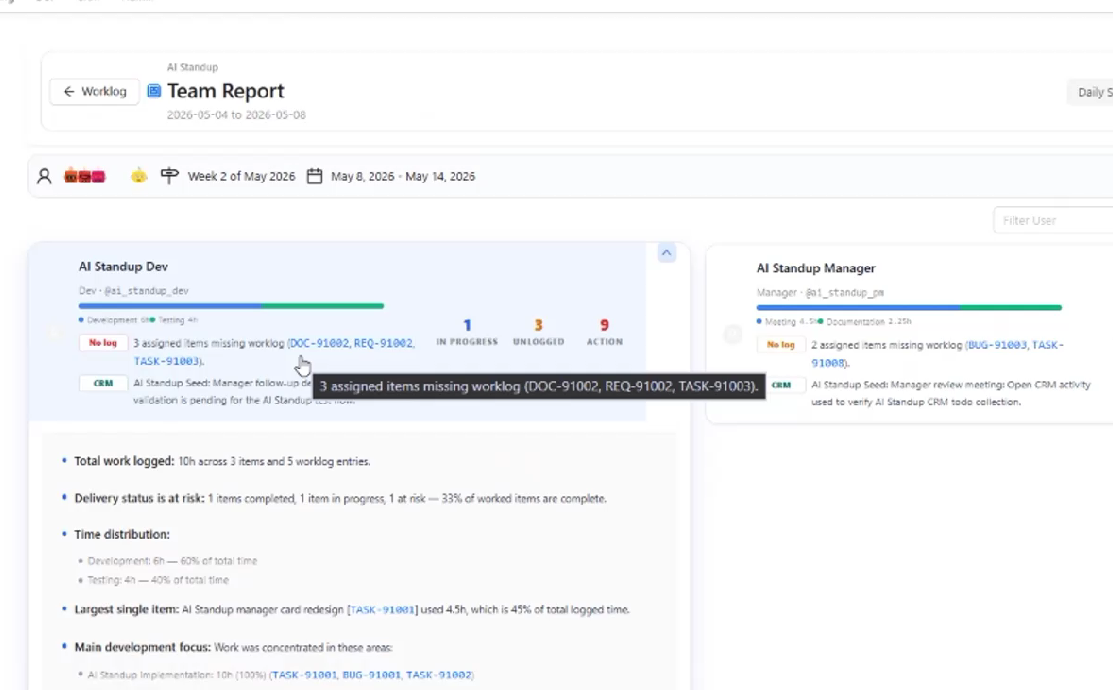
- The Team Report allows users to generate a detailed performance report for a selected milestone or custom date range. To create a report, select the desired milestone or date range, choose the user for whom the report should be generated, and then click Generate Standup Report.
- Once the report is generated, the report name is displayed along with an overview section. This overview highlights important information such as CRM activities, identified risks, and other key performance indicators for the selected user.
- When the report is expanded, it provides a detailed summary of the user's work during the selected period. This includes:
- Total hours worked.
- Completed tasks and activities.
- Time distribution across different work items.
- Tasks that consumed the most effort.
- Areas where the user spent the majority of their time and focus.
- Overall productivity and contribution summary.
- The report also includes information about the specific tasks worked on, any related CRM activities, pending follow-ups, and outstanding to-do items.
- In addition to the detailed activity data, the system generates a high-level AI summary based on all recorded work notes, time entries, and completed activities. For example, if a user worked on ten different tasks and logged work notes and time against each of them, the AI analyzes that information and produces a concise summary of the user's overall performance, accomplishments, focus areas, and progress during the selected reporting period.
AI Standup History
- Users can also view the history of previously generated reports at any time.
FAQs / Troubleshooting
FAQs
What is AI Standup used for?
AI Standup is used to automate daily progress reporting by collecting development activities and generating structured standup summaries.
Can AI Standup replace daily standup meetings?
Yes, it can support or partially replace traditional standup meetings by providing automated daily updates.
What information does AI Standup include?
It includes daily progress, planned versus completed work, pull requests, ongoing tasks, and manual input from team members.
Can users add manual updates?
Yes, manual input can be included to provide additional context that may not be captured automatically.
Troubleshooting
- AI Standup report is not showing recent updates: Check whether development activities such as tasks, commits, or pull requests are being tracked correctly in the system.
- Planned work is not appearing in the report: Ensure that work items are properly assigned and commitments are updated before the standup report is generated.
- Pull requests or activity data are missing: Verify that the required development tools or integrations are connected and syncing properly.
- Standup summary seems incomplete: Add manual input to include important updates or context not captured automatically.
Changelog
- Daily Standup is now the default AI Standup view, with PR review visibility and reviewer assignment support [202605]