External Service
An External Service is an integration that links the platform with tools like Slack, Discord, Teams, Mattermost, or Text to deliver automated alerts such as test results or status updates. Users can configure it by entering the name, notification channel, authentication type, and required webhook or token. After saving, it appears in the list with its details and a delete option, enabling secure automated notifications to external platforms.
Why it matters / Use Cases:
- Automated External Notifications: Delivers automated test notifications directly to external platforms for timely communication.
- Automated Real-Time Updates: Reduces manual effort by sending real-time updates to preferred channels.
- Centralized Alert Management: Improves team collaboration by centralizing important alerts.
- Automated Test Result Notifications: Sends test results to Slack, Discord, Teams, Mattermost, or Text.
- Real-Time Test Alerts: Notifies team members instantly when a test fails or completes.
- Automated Report Delivery: Shares scheduled or event-based reports through webhooks.
- Seamless Communication Integration: Integrates test activity alerts into existing communication workflows.
Prerequisites
- Access to ZeuZ Server with permissions for Testing → Deployments → Run Tests.
- Access to the external service account (Slack, Discord, Teams) to generate the necessary webhook or authentication token.
Quick-Start
- Navigate to the Run Tests page.
- Click on the "Edit" button of the External Service on the "Basic" tab.
Features
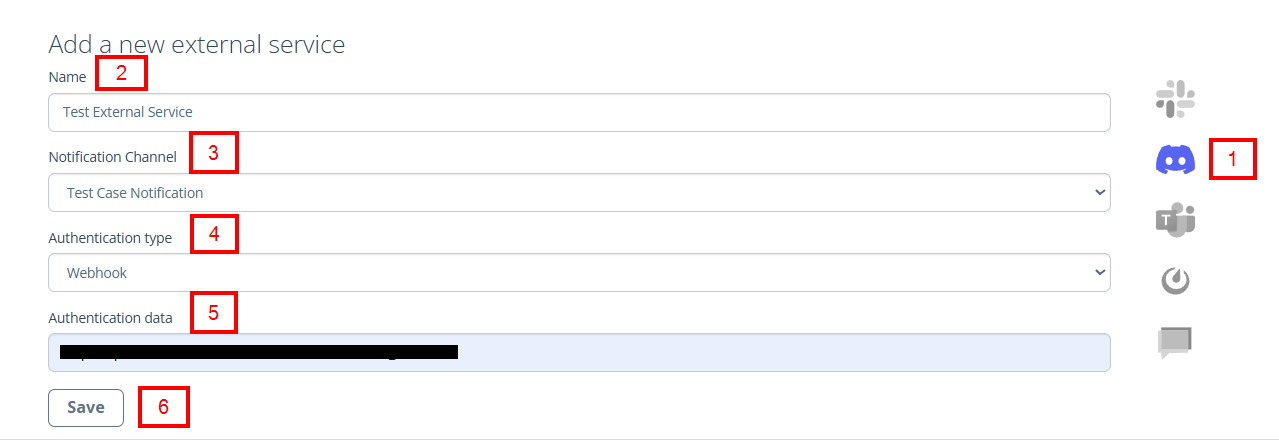
Add a new external service
- Select a service from the following options: Slack, Discord, Teams, Mattermost, or Text.
- The user can create a new external service by providing the required details:
- Name: A label for identifying the integration (e.g., Test External Service).
- Notification Channel: A defined method used to deliver specific types of system alerts and updates to users (e.g., Test Case Notification, System Info Notification).
- Authentication type: It enables the system to connect to an external service through a webhook endpoint for secure message delivery (e.g., Webhook).
- Authentication data: The webhook URL provided by the external service, which the system uses to send authenticated messages or notifications.
- After entering all the required details, click the Save button.
External Service details
- After saving, the integration appears in the External Services list below, with the table displaying the following details:
- Name: This is the user-defined name for the external service configuration (e.g., Test External Service).
- Service name: This specifies the external platform that will receive notifications (e.g., discord).
- Auth type: This indicates the method used for authentication (e.g., incoming_webhook).
- Auth data: The webhook URL provided by Slack, Discord, Teams etc. Here, the URL is used to send automated messages or test notifications to the designated Discord channel.
- DELETE button: Allows the user to remove a specific external service configuration.

FAQs / Troubleshooting
Why is my notification not appearing in Slack/Discord/Teams?
Ensure that the correct webhook URL is used and the external service is properly saved. Check that the selected notification channel is active.
What happens if the webhook URL is invalid?
Notifications will fail to send. Verify the URL and re-enter it if necessary.
Why am I not receiving test notifications?
Confirm that the authentication type is correctly configured and that the target platform is accessible.
Is it possible to remove an external service?
Yes, select the service and use the Remove/Delete option to delete it.
How do I verify that the external service is working?
Send a test notification to verify that it appears on the configured channel.
Changelog
- New UI has been introduced [20250712]