Rearrangement of test cases in a Test Set
Rearrangement of test cases in a test set refers to the process of changing the order in which individual test cases are positioned within that set. This allows a tester to place high-priority or dependent tests earlier, improving clarity and execution flow. In general, rearranging ensures that the test set follows a logical sequence, making the overall testing process more efficient and easier to manage.
Why it matters / Use Cases:
- Prioritized Test Execution: Ensures that high-priority or critical test cases are executed first for faster issue detection.
- Dependency Alignment: Improves execution efficiency by placing dependent test cases in the correct sequence.
- Logical Organization: Enhances clarity by organizing test cases in a logical and easy-to-follow order.
Prerequisites
- Access to ZeuZ Server with permissions for Testing → Deployments → Set.
- The test set must already be created and accessible to the tester.
- Test case dependencies and priorities should be identified before rearranging.
Quick-Start
- Navigate to the Test Set page.
- Click the Edit Test Case Order button.
Features
Reorder test cases
- Navigate to the Set page.
- Click the specific Test Set to reorder its test cases.

Edit Test Case Order
- Click the "Edit Test Case Order" button on the Test Set page.
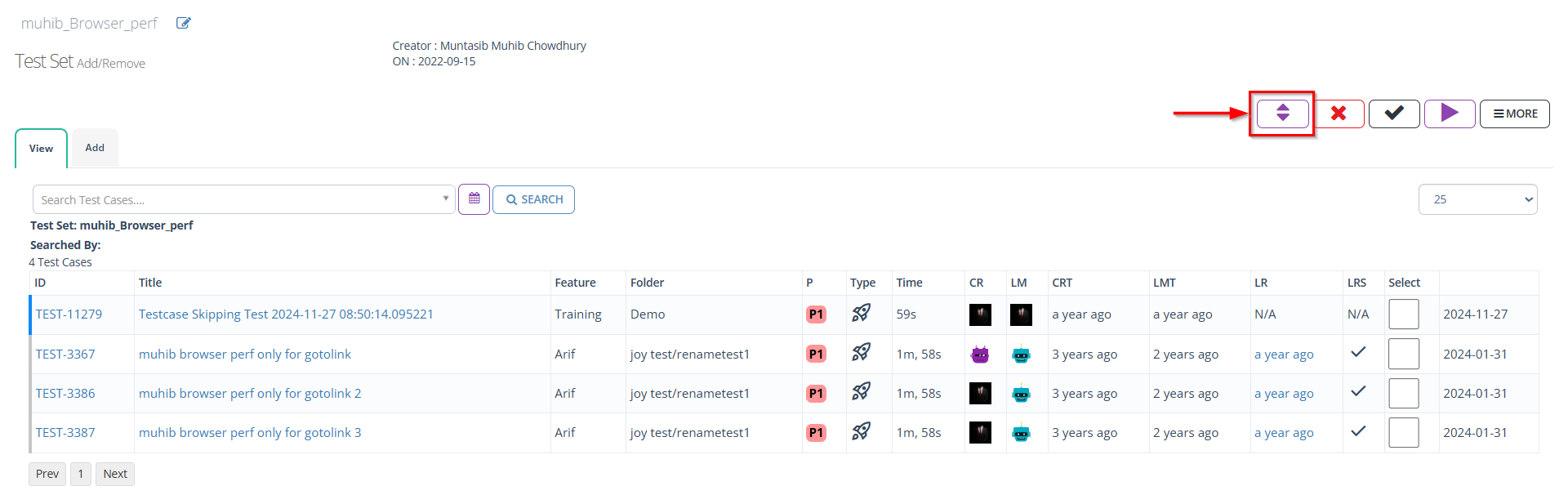
Drag and drop test cases
- Navigate to the Test Set Reorder page.
- Drag and drop the required test case to the desired position.
- After placing the test cases in the desired positions, click the SAVE button.

FAQs / Troubleshooting
FAQs
How can I reorder test cases in a Test Set?
Click the Edit Test Case Order button and use drag-and-drop to place test cases in the desired sequence, then click Save.
Can I reorder test cases across different Test Sets?
No, test case reordering is only allowed within the same Test Set.
Will reordering affect previous test executions?
No, changing the order only affects future executions in that Test Set.
Is there a way to save a default test case order for all Test Sets?
No, ordering is specific to each Test Set and must be managed individually.
Troubleshooting
- Drag-and-drop not working: Ensure that the browser supports the feature and that the page is fully loaded.
- Changes not saving: Click Save and confirm you have edit permissions.
- Positions not updating: Refresh the page or clear browser cache.
- Edit button inaccessible: Check your role/permissions and Test Set status.
- Save errors: Ensure that no test case is part of an ongoing execution, and contact support if the issue continues.
Changelog
- Adopted the new card view on the Test Set page [20250712]